Introduction
Pertama Property is a Property Management System (PMS) that can be integrated with the Channel Manager. Through this integration, you can manage your property listings, synchronize room availability, rates, and restrictions, and receive bookings directly within the system.
Once the integration is fully configured, all reservations from Pertama Property will appear in the Booking List, allowing you to manage them efficiently in one place.
Accessing Pertama Property Setting
Here’s how you can access Pertama Property setting:
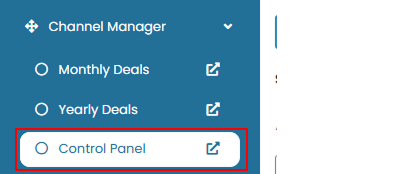
- On the Channelku, navigate to the Channel Manager menu, then click Control Panel.
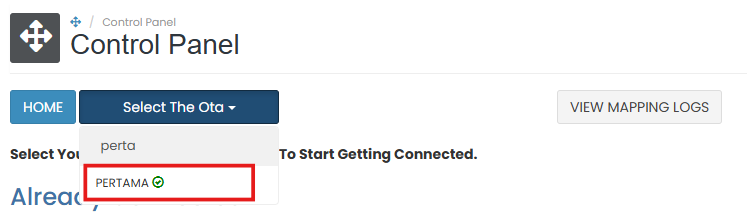
- Select Pertama Property from the channel list, or you can search from the list by type the OTA name.
Pertama Property Information
This section provides general guidance for connecting your property to Pertama Property. However, specific connection instructions are not shown within the system.
 To proceed with the integration, please contact your Channel Manager Support team. They will assist you with the required credentials and activation process.
Username
The Username tab is used to view or update the credentials required to connect with Pertama Property.
How to Update Credential
- Navigate to the Username tab. Enter the username, password or Hotel ID assigned to your property by Pertama Property.
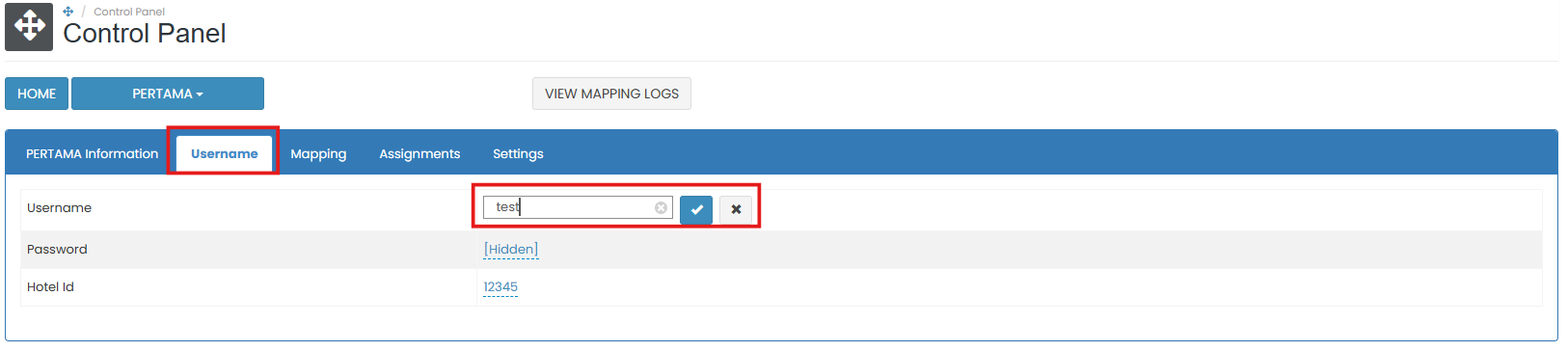
- Click the save (✓) button to apply the change. If you don’t want to save the change, click cancel (x).
[!NOTE]
Troubleshooting Credential Update
Failed to Save Credentials
- Make sure all the fields (Username, Password, Hotel ID) is valid and correctly copied from Pertama Property.
- Check your internet connection and try again.
Changes Not Reflected After Saving
- Refresh the page to confirm if the changes have been applied.
- If not saved, re-enter the Property ID and click the save (✓) button again.
Mapping
The Mapping feature is used to link your internal rooms and rate plans with the corresponding rooms and rate plans from Pertama Property. To create room mapping, please follow the steps in How to Add Mapping.
Settings
The Settings tab controls how your system interacts with Pertama Property, including data synchronization and reservation handling.
How to Configure Setting
To modify Pertama Property parameters, navigate to the Settings tab. This section contains several configurable option:
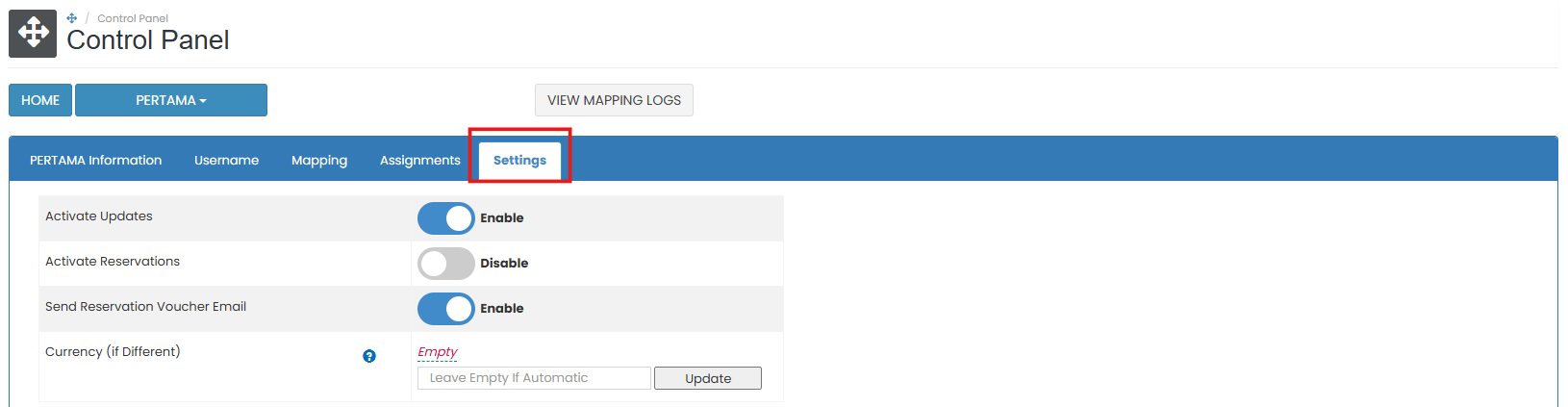
- Activate Updates: Turn on this option to allow the system to push rate, availability, and restriction updates to Pertama Property.
- Activate Reservations: Enable this option to receive bookings from Pertama Property.
- Send Reservation Voucher Email: Enable this option to trigger the automated delivery of a reservation voucher upon receipt of a new booking.
- Currency (if Different) section: Choose the currency if it differs from the system’s default. Enter the conversion rate and click the save (✓) button to apply the changes.

[!NOTE]
Troubleshooting Settings
Enable Channel or Activate Updates not working
- Make sure the checkbox is selected and click the Update button afterward.
- If the changes do not apply, refresh the page and try again.
Not receiving reservations from Pertama Property
- Confirm that Activate Reservations is turned on.
- Make sure rate plans are mapped and active on both Pertama Property and the system.
Reservation voucher email not received
- Ensure Send Reservation Voucher Email is enabled.
- Check your spam or junk folder, or confirm your email address in the notification settings.
Import Future Pertama Property Reservations not working
- Refresh the page and click again.
- If no reservations are imported, check with Pertama Property if new bookings exist and are confirmed.
Currency field not saving properly
- Click to clear, then re-select the currency code.
- If left empty, the system will auto-detect the correct currency at the time of booking.